
Cloud Robotics: On-Robot Networking Challenges and Solutions
By Ilia Baranov, Co-Founder & CTO at Polymath Robotics
A modern mobile robot is basically a data center on wheels. It has all the problems of a data center (complexity, cost, large data volumes) and almost none of the supporting infrastructure that makes data centers tractable: no reliable power, poor network connectivity, compute and memory tightly constrained by weight and battery.
If I wanted to make a website in the mid-90s, I'd have to know a lot about networking, servers, infrastructure, and programming. Today I don't have to know any of those things to spin up an e-commerce site, with tools like AWS, Cloudflare, and Shopify providing trivial-to-use components at reasonable prices. There hasn't yet been a comparable moment in robotics, especially not in the heavy industrial autonomy that Polymath Robotics focuses on. We're big fans of ROS2 and NAV2, but comparing them to AWS is like comparing a home toolbox to a mostly automated car factory: both can assemble a car, one of them just takes 20 minutes per car, and the other will get around to it once all the other house chores are sorted, about a decade later.
This piece is the start of a series on the missing pieces. Polymath publishes this work openly because we'd rather not see multiple teams in robotics make the same mistakes. On-vehicle networking comes first, because without it nothing else in the stack works: you can't monitor or control what you can't connect to.
Where we are today
A typical server in a data center assumes 18-27°C, zero vibration, and filtered air. None of those things exist on a mine, a construction site, or a farm, where the robot is expected to run in rain, fine silica dust, and 40°C heat while bouncing over uneven ground. A typical autonomous vehicle runs its full perception and planning stack on something like a single NVIDIA Jetson, hardware a cloud engineer would consider barely adequate for a build server.
Robotics is also a much smaller market. Over $500 billion is spent on data centers globally each year. Mobile robots (excluding factory assembly arms, which are mostly static) account for less than $10 billion. If you build networking equipment, which market do you prioritize?
The result is harsher operating conditions, less funding, and almost no standards. TCP and UDP exist in both worlds, but beyond that very basic layer there is little in common. A data center server has IPMI or Redfish for remote management, SNMP or Prometheus for monitoring, and established APIs for log aggregation and alerting. A robot in the field has whatever the integrator cobbled together. A data center operator can buy switches from five vendors and expect them to interoperate; a robotics team is often locked into a single vendor's radios, sensors, and middleware, with no standard interface between any of them.
Worst of all, in robotics you have thousands of vendors for actuators and sensors, even less standardized than the compute and networking equipment. In my career I have yet to find two similar sensors from different vendors (two lidars, say, or two motors) that could share the same control software. All bets are off here: one vendor ships a clean device-hosted webpage with an onboard API, another ships a Windows-only utility that barely works. Even within the same vendor, similar product lines often run wildly different software.
If Cisco won't build for the mine, the mine must come to Cisco
We considered asking our clients to relocate their mining operations to the backyard of a data center, but were informed this was not a good idea, for either party.
If networking equipment vendors won't build for the mine, the practical move is to make robotics communication, data, and control look like data center networking problems.
At Polymath we've standardized on Gigabit Ethernet with PoE (802.3at/bt) as the communication layer for everything on the vehicle. Devices that don't speak Ethernet get a converter (CAN-to-Ethernet adapters work well for vehicle bus integration; we've used the Axiomatic AX140900). PoE 802.3bt provides around 90 W, which is enough to power most sensors and networking gear directly. Where a sensor won't accept PoE input, a PoE splitter close to the sensor keeps the install down to a single cable for power and data.
Ethernet has practical advantages for field installation and repair: cables are common, technicians already know how to handle them, and the rugged variants now available (outdoor-rated and armored cables, M12 X-coded connectors instead of RJ45) cope with the conditions. A gigabit connection is enough bandwidth for the large amounts of data volumes involved. Some of our robots generate around 12 GB per minute of operation, roughly 3 PB per year, mostly lidar and camera.
This won't suit every use case. If the robot is moving very fast, or if cost is being squeezed hard, the trade-offs change. For heavy industry, including mining, it has been a workable design.
Most network-enabled sensors aren't smart devices
The first practical problem is that most network cameras (most speak RTSP, so there is at least some standard there) ship from the factory with a fixed IPv4 address and won't accept a DHCP-assigned one. Order four cameras for a vehicle's four directions and they will all arrive set to 192.168.1.100. Plug them into a switch and nothing good happens.
Today we painfully spin up the terrible Windows-only utility, or use some arcane Linux command line invocation, to configure the cameras one at a time to a new IP address that fits the DHCP range used on the vehicle network (in our case the Peplink modem). This is done before the camera is mounted, which adds time to autonomy installation and is more error-prone than it should be.

The harder problem is field replacement. When (not if) a camera or other sensor fails in the field, there's no rapid way to swap it. Ideally a site keeps an inventory of plug-and-play spares, but the configuration step means a technician must first identify which sensor failed, look up its IP, configure the replacement to that address (usually at a setup bench, not on the vehicle), and only then install it. This is slow and error-prone, especially given that the technicians who service mining vehicles are mechanics first, not networking specialists.
This matters more in mining than in other industries. Conditions are harsh in both weather and terrain, uptime requirements are high, and it's often not feasible to tow a large mining vehicle to a service centre, so field repairs and replacements are more common than in most off-highway use cases. Mining needs a solution that's fast, works in the field, and survives those conditions.
Other quirks worth knowing about:
Some devices are DHCP-only, so the network has to support both addressing modes.
Some sensors, particularly lidars, blast multicast traffic indiscriminately. We've seen this cause network outages and crash simpler ethernet devices on the same segment.
On-vehicle sensors benefit from PTP for time synchronization, with the main computer as the local PTP source.
For high-uptime configurations, two computers run primary and hot spare. Ideally both receive the same data continuously, with automatic cutover on primary failure.
Devices use a mix of TCP and UDP across a wide range of ports, sometimes changing mid-operation. Solutions can't be restricted to specific protocols or ports.
Most devices don't print MAC addresses on the box or the device itself, so MAC-based identification isn't reliable.
Network design and on-vehicle monitoring
Two patterns help here: writing the vehicle network down as a spec up front, and using that same spec at runtime to monitor the live network.
For planning, a small web tool lets the integrator pick components for a new vehicle from a known list and have the network laid out and IPs assigned automatically. The output is a deployment spec plus a network diagram (we generate ours as Mermaid diagrams), which becomes the install document for the field team and the source of truth for whatever runs next.
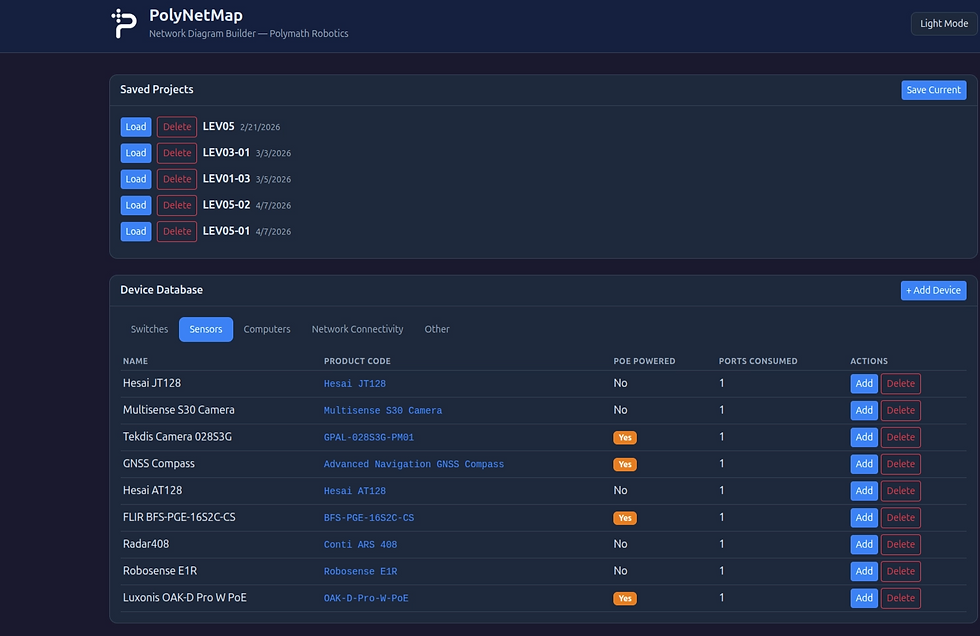

For monitoring, a container runs on the Peplink modem, watches the local network, compares what it finds against the planned topology, and serves a status page over the team VPN. Anyone watching the robot can see immediately whether the network is configured correctly or a device has stopped responding.

Neither idea is novel (network-as-document, runtime topology check), but neither is widely available off the shelf for mobile robotics.
What we've tested, what's worth evaluating
VLANs (managed switches): tested and recommended where it fits. Splitting a single physical network into several software-defined ones solves the same-IP-on-multiple-cameras problem cleanly, and isolates multicast traffic so a noisy lidar can't take down a brittle ethernet device on the same segment. The cost is that VLANs require managed switches (more expensive than unmanaged) and add configuration complexity that has to be maintained. We've had good results with rugged layer-2 managed switches.
NAT: the obvious answer, with a hardware gap. No product on the market meets the requirements (PoE, Gigabit or better, rugged, and not atrociously expensive). A purpose-built Linux routing computer with twenty hardware ports and switching software is possible but heavy-handed. A lighter path is a small dedicated machine running an open-source firewall and routing platform such as OPNsense, with just enough ports for the field router, computers, and switches. Worth evaluating, though we haven't deployed it as the default.
What's next
Three problems sit downstream of on-vehicle networking, and the rest of the stack depends on them:
Getting data off the vehicle and out to other machines or operators.
Using that data to draw conclusions about the health of a single machine, or of a whole fleet.
Doing the on- and off-vehicle networking in a software-defined way, so software regulates itself in the common cases and 100 robots don't require 20 people to manage them.
I'll cover some of the techniques we've developed at Polymath in the next post, and we'll continue to open-source as much of our work as possible.


